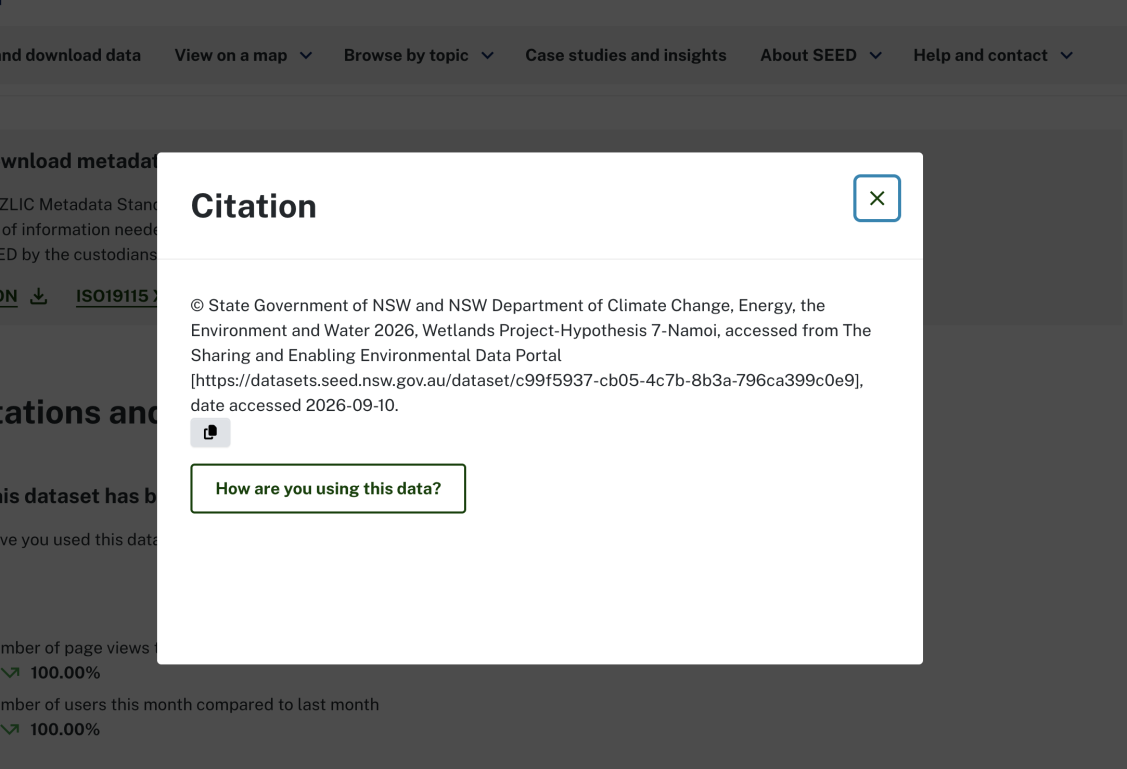
Citations show how people are using SEED data and make it easy to reference datasets with a simple copy-and-paste. You can:
- view citations
- contribute citations, or
- copy and paste citations for quick referencing.
How to view citations
You can access all recorded citations in the left-hand panel of the ‘search and download data’ section.

- Select ‘How is this data used?’ to view a pop up that shows how SEED data is used in reports, journals, articles etc.
- Select individual citation links to view where data is cited.

You can also view citations for specific datasets.
- Select the dataset you want to view and scroll to the bottom of the page
- Select ‘See how the data has been applied’ to view all citations.

How to contribute citations
If you have used a dataset in your work and want to share the citation with us, select the relevant dataset and scroll to the bottom of the page.
Select citation link
Select the ‘Reference with this citation’ link. A pop-up will appear.

Determine how you're using your data
Select 'How are you using this data?’ button.

Fill in your details
Fill in the details, including your contact information, and hit send. This will help the SEED team get in touch to publish your citation.

Quick reference citations
- Scroll to the bottom of the dataset you want to reference.
- Select the ‘Reference with this citation’ link. A pop-up will appear.
- Click the copy icon to copy the exact citation format and paste it directly into your documentation.